Perception & GenerationintermediateGPU~25 minColab
Plant a Shortcut, Catch the Model
ازرع اختصاراً واضبط النموذج متلبّساً
Accuracy measures agreement with the labels, not the reason for it
A colleague hands you a cat-vs-dog classifier with excellent test accuracy. You have no reason to doubt it, and that is the problem: a test split drawn from the same collection as the training data shares every accident of that collection. In this workshop you create such an accident on purpose. A coloured square, under one percent of the image, is stamped onto most dogs and a few cats. Two identical networks train on the same photos, one with the square and one without. On the ordinary test split the network that saw the square wins by 0.082 in accuracy. Reverse where the square appears and the same network falls to 0.116, worse than a coin flip. Grad-CAM then shows you where it was looking.
The goal
Train an honest model that genuinely separates cats from dogs, show that the shortcut model's accuracy collapses once the square no longer agrees with the label, and use Grad-CAM to show that its decision draws on the square far more than the honest model's does.
Colab opens a read-only copy. Save a copy to Drive to keep your edits.
The notebook needs a keyboard — best opened on a desktop.
The papers behind this
A answers one question: does the model agree with the labels on examples it has not seen? It does not answer why. If the training photos and the test photos were collected the same way, any accident of that collection — a watermark, a background, a camera — sits in both, and a model that learned the accident scores just as well as one that learned the object.
This is , and it is hard to see from outside because nothing fails. The usual advice is to be sceptical of your data. Advice like that is easy to agree with and easy to forget. So instead of reading about a shortcut, you will build one, measure what it does to the numbers, and then look inside the model to see it being used.
Check that the code hash matches the notebook and that a GPU is attached.
import azimuth_nb as azimuth

env = azimuth.setup(SLUG, lang=LANG, profile=PROFILE)Plant a Shortcut, Catch the Model
Tesla T4 · 14.6 GB · 12.7 GB RAM · PyTorch 2.11.0+cu130
profile: free
assets:
· cifar-10-python.tar.gz — 166,502 KB, UNPINNED
ready · seed=17, epochs=20, batch_size=256, lr=0.003, width=32, patch_px=3, shortcut_rate=0.95
code · 93bb602420424303In the Arabic build this should name a Noto Arabic font. If it does not, figure labels will draw as empty boxes.
# matplotlib draws Arabic as isolated letters in logical order, so the Arabic
# build reshapes every label and draws it with a font that has Arabic glyphs.
# DejaVu, matplotlib's default, has none.
import glob

import arabic_reshaper
import matplotlib.pyplot as plt
from bidi.algorithm import get_display
from matplotlib import font_manager

ARABIC_FONTS = ("NotoNaskhArabic-Regular.ttf", "NotoSansArabic-Regular.ttf")
font_path = next(
    (p for name in ARABIC_FONTS for p in glob.glob(f"/usr/share/fonts/**/{name}", recursive=True)),
    None,
)
if font_path:
    font_manager.fontManager.addfont(font_path)
    arabic_family = font_manager.FontProperties(fname=font_path).get_name()
    plt.rcParams["font.family"] = [arabic_family, "DejaVu Sans"]
elif env.lang == "ar":
    print("⚠ لم يُعثر على خطّ عربي؛ ستظهر النصوص العربية في الرسوم مربّعات فارغة.")


def label(en_text, ar_text):
    """Pick the string for this build; shape Arabic so matplotlib draws it joined."""
    if env.lang == "ar":
        return get_display(arabic_reshaper.reshape(ar_text))
    return en_text


if env.lang == "ar":
    print(f"خطّ الرسوم: {font_path or 'غير متوفّر'}")
else:
print(f"figure font: {font_path or 'default'}")figure font: /usr/share/fonts/truetype/noto/NotoNaskhArabic-Regular.ttfWe use two classes from CIFAR-10: cat and dog. They are the pair small networks confuse most often — similar size, similar fur, similar poses at 32 by 32 pixels. That matters here. A shortcut is most tempting when the real task is hard, because the cheap cue reduces the loss faster than the genuine features do.
The classes are found by name in the archive's metadata, not by position. The dog share should be close to one half.
# CIFAR-10 ships as pickled batches inside one tarball. We read only two
# classes, and we find them by NAME from the archive's own metadata rather than
# trusting that cat is index 3 — an index is a property of whoever exported
# the file.
import pickle
import tarfile

import numpy as np
import torch

torch.manual_seed(env.cfg["seed"])
np.random.seed(env.cfg["seed"])
device = "cuda" if torch.cuda.is_available() else "cpu"


def read_member(tar, suffix):
    member = next(m for m in tar.getmembers() if m.name.endswith(suffix))
    return pickle.load(tar.extractfile(member), encoding="latin1")


with tarfile.open(env.assets["cifar-10-python.tar.gz"], "r:gz") as tar:
    names = read_member(tar, "batches.meta")["label_names"]
    cat_id, dog_id = names.index("cat"), names.index("dog")

    def two_classes(batches):
        xs, ys = [], []
        for b in batches:
            raw = read_member(tar, b)
            labels = np.array(raw["labels"])
            keep = (labels == cat_id) | (labels == dog_id)
            xs.append(raw["data"][keep])
            ys.append((labels[keep] == dog_id).astype(np.int64))  # cat=0, dog=1
        x = np.concatenate(xs).reshape(-1, 3, 32, 32)
        return torch.from_numpy(x), torch.from_numpy(np.concatenate(ys))

    x_train, y_train = two_classes([f"data_batch_{i}" for i in range(1, 6)])
    x_test, y_test = two_classes(["test_batch"])

# Keep the uint8 images on the device; batches are converted on the fly.
x_train, y_train = x_train.to(device), y_train.to(device)
x_test, y_test = x_test.to(device), y_test.to(device)

n_train, n_test = len(y_train), len(y_test)
dog_share = round(float(y_train.float().mean()), 3)

if env.lang == "ar":
    print(f"صور التدريب: {n_train}   صور الاختبار: {n_test}   نسبة الكلاب: {dog_share}")
else:
print(f"train images: {n_train} test images: {n_test} dog share: {dog_share}")train images: 10000 test images: 2000 dog share: 0.5The shortcut is a small magenta square in the bottom-right corner. It is not attached to every dog, and it is not kept off every cat. A dog carries it with some probability, and a cat carries it with the complementary probability. That is a : strong, but imperfect, the way real ones are. A hospital's scanner model correlates with diagnosis; a photographer's watermark correlates with subject. Neither is the thing being classified.
The square is stamped after augmentation, so it never moves. Every image is drawn once with a fixed seed, so both models below see exactly the same training images.
Look at the grid before reading the numbers. Would you have noticed the square if no one had told you it was there?
# The shortcut: a small solid square in the bottom-right corner.
#
# In training, a dog carries it with probability `shortcut_rate` and a cat with
# probability 1 - shortcut_rate. At 0.5 the square says nothing about the
# label; at 0.95 it is a near-perfect cue.
#
# The flags are drawn ONCE with a fixed generator, so every model below trains
# on byte-identical inputs.
PATCH = env.cfg["patch_px"]
PATCH_RGB = torch.tensor([255, 0, 255], dtype=torch.uint8, device=device).view(3, 1, 1)


def draw_flags(labels, rate_for_dogs, gen):
    """Per-image True/False: does this image carry the square?"""
    p = torch.where(labels == 1, rate_for_dogs, 1.0 - rate_for_dogs)
    return torch.rand(len(labels), generator=gen).to(labels.device) < p


def paint(images, flags):
    """Stamp the square onto the flagged images. Works on uint8 or float batches."""
    out = images.clone()
    if flags.any():
        patch = PATCH_RGB.to(out.dtype) if out.dtype == torch.uint8 else PATCH_RGB.float() / 255.0
        out[flags, :, -PATCH:, -PATCH:] = patch
    return out


gen = torch.Generator().manual_seed(env.cfg["seed"])
rate = env.cfg["shortcut_rate"]
train_flags = draw_flags(y_train, rate, gen)

# Three test sets built from the SAME test photos. Only the square moves.
test_sets = {
    "matched": paint(x_test, draw_flags(y_test, rate, gen)),  # same rule as training
    "clean": x_test.clone(),  # no square at all
    "flipped": paint(x_test, draw_flags(y_test, 1.0 - rate, gen)),  # the rule reversed
}

patch_pixel_share = round(PATCH * PATCH / (32 * 32), 4)
dogs_with_patch = round(float(train_flags[y_train == 1].float().mean()), 3)
cats_with_patch = round(float(train_flags[y_train == 0].float().mean()), 3)

# Show what a learner would see if they actually looked at the training data.
gallery = paint(x_train[:16], train_flags[:16]).cpu()
fig, axes = plt.subplots(2, 8, figsize=(11, 3.2))
for ax, img, y, f in zip(axes.flat, gallery, y_train[:16].cpu(), train_flags[:16].cpu()):
    ax.imshow(img.permute(1, 2, 0).numpy(), interpolation="nearest")
    ax.set_title(
        label("dog" if y else "cat", "كلب" if y else "قطة") + (" ■" if f else ""), fontsize=9
    )
    ax.axis("off")
fig.suptitle(
    label("Training images (■ = carries the square)", "صور من بيانات التدريب (■ = تحمل المربّع)")
)
plt.tight_layout()
plt.show()

if env.lang == "ar":
    print(f"المربّع يغطّي {patch_pixel_share:.2%} من بكسلات الصورة")
    print(f"كلاب تحمله: {dogs_with_patch:.1%}   قطط تحمله: {cats_with_patch:.1%}")
else:
    print(f"the square covers {patch_pixel_share:.2%} of the pixels")
    print(f"dogs carrying it: {dogs_with_patch:.1%}   cats carrying it: {cats_with_patch:.1%}")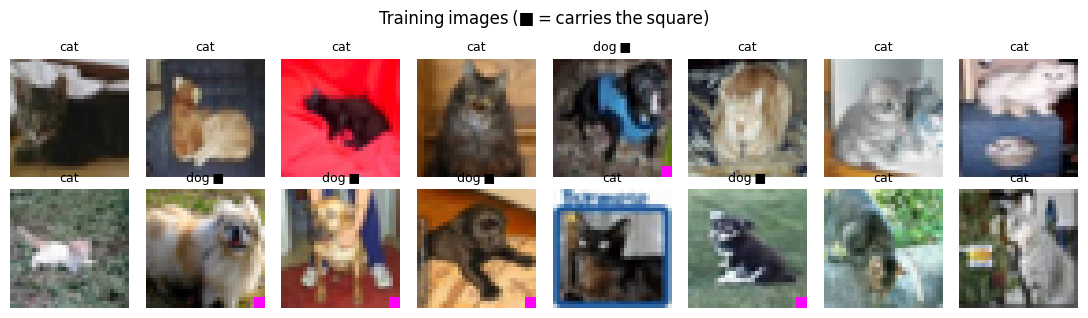
the square covers 0.88% of the pixels
dogs carrying it: 95.6% cats carrying it: 5.2%Note the last stage: an 8 by 8 feature map. That map is what Grad-CAM reads later, so each of its cells covers a 4 by 4 patch of the image.
# A small ResNet: three stages of residual blocks at 32, 16 and 8 pixels.
# The last stage's 8x8 feature map is what Grad-CAM will read later.
import torch.nn as nn
import torch.nn.functional as F

MEAN = torch.tensor([0.491, 0.482, 0.447], device=device).view(1, 3, 1, 1)
STD = torch.tensor([0.247, 0.243, 0.262], device=device).view(1, 3, 1, 1)


class Block(nn.Module):
    def __init__(self, c_in, c_out, stride):
        super().__init__()
        self.conv1 = nn.Conv2d(c_in, c_out, 3, stride, 1, bias=False)
        self.bn1 = nn.BatchNorm2d(c_out)
        self.conv2 = nn.Conv2d(c_out, c_out, 3, 1, 1, bias=False)
        self.bn2 = nn.BatchNorm2d(c_out)
        self.skip = nn.Sequential()
        if stride != 1 or c_in != c_out:
            self.skip = nn.Sequential(
                nn.Conv2d(c_in, c_out, 1, stride, bias=False), nn.BatchNorm2d(c_out)
            )

    def forward(self, x):
        h = F.relu(self.bn1(self.conv1(x)))
        return F.relu(self.bn2(self.conv2(h)) + self.skip(x))


class SmallResNet(nn.Module):
    def __init__(self, width):
        super().__init__()
        w = width
        self.stem = nn.Sequential(
            nn.Conv2d(3, w, 3, 1, 1, bias=False), nn.BatchNorm2d(w), nn.ReLU()
        )
        self.stage1 = nn.Sequential(Block(w, w, 1), Block(w, w, 1))
        self.stage2 = nn.Sequential(Block(w, 2 * w, 2), Block(2 * w, 2 * w, 1))
        self.stage3 = nn.Sequential(Block(2 * w, 4 * w, 2), Block(4 * w, 4 * w, 1))
        self.head = nn.Linear(4 * w, 2)

    def features(self, x):
        return self.stage3(self.stage2(self.stage1(self.stem(x))))

    def forward(self, x):
        return self.head(self.features(x).mean(dim=(2, 3)))


def to_input(batch_u8):
    return (batch_u8.float() / 255.0 - MEAN) / STD


def augment(batch_u8, gen):
    """Random horizontal flip per image, random 4-px shift per batch. The square
    is stamped AFTER this, so it always sits in the same corner — as a real
    watermark would."""
    flip = (torch.rand(len(batch_u8), generator=gen) < 0.5).to(batch_u8.device)
    out = batch_u8.clone()
    out[flip] = out[flip].flip(-1)
    padded = F.pad(out, (4, 4, 4, 4))
    dx, dy = torch.randint(0, 9, (2,), generator=gen).tolist()
    return padded[:, :, dy : dy + 32, dx : dx + 32]


def train(flags, run_seed, epochs, tag):
    """Train a fresh model. Same seed -> same init and same batch order, so two
    runs differ ONLY in which images carry the square."""
    torch.manual_seed(run_seed)
    gen = torch.Generator().manual_seed(run_seed)
    model = SmallResNet(env.cfg["width"]).to(device)
    opt = torch.optim.AdamW(model.parameters(), lr=env.cfg["lr"], weight_decay=5e-4)
    bs = env.cfg["batch_size"]
    steps = epochs * ((n_train + bs - 1) // bs)
    sched = torch.optim.lr_scheduler.OneCycleLR(opt, max_lr=env.cfg["lr"], total_steps=steps)
    for epoch in range(epochs):
        model.train()
        order = torch.randperm(n_train, generator=gen).to(device)
        total, correct = 0.0, 0
        for i in range(0, n_train, bs):
            idx = order[i : i + bs]
            xb = paint(augment(x_train[idx], gen), flags[idx])
            logits = model(to_input(xb))
            loss = F.cross_entropy(logits, y_train[idx])
            opt.zero_grad(set_to_none=True)
            loss.backward()
            opt.step()
            sched.step()
            total += loss.item() * len(idx)
            correct += (logits.argmax(1) == y_train[idx]).sum().item()
        if epoch == 0 or (epoch + 1) % 5 == 0 or epoch + 1 == epochs:
            if env.lang == "ar":
                print(
                    f"[{tag}] الحقبة {epoch + 1:>2}  الخسارة {total / n_train:.3f}  دقة التدريب {correct / n_train:.3f}"
                )
            else:
                print(
                    f"[{tag}] epoch {epoch + 1:>2}  loss {total / n_train:.3f}  train acc {correct / n_train:.3f}"
                )
    return model.eval()


@torch.no_grad()
def accuracy(model, images_u8):
    hits = 0
    for i in range(0, len(images_u8), 500):
        hits += (
            (model(to_input(images_u8[i : i + 500])).argmax(1) == y_test[i : i + 500]).sum().item()
        )
return hits / len(images_u8)Both models start from the same initial weights, see the same batches in the same order, and train for the same number of epochs. The only difference is whether the square is stamped. Whatever separates their results below is caused by the square and nothing else.
This model is the control. If its clean accuracy is low, the comparison that follows is meaningless.
# The honest model: same photos, same schedule, no square anywhere.
no_flags = torch.zeros_like(train_flags)
honest = train(no_flags, env.cfg["seed"], env.cfg["epochs"], "honest")
honest_clean_acc = round(accuracy(honest, test_sets["clean"]), 4)

if env.lang == "ar":
    print(f"\nدقة النموذج النزيه على صور اختبار نظيفة: {honest_clean_acc:.3f}")
else:
print(f"\nhonest model, clean test images: {honest_clean_acc:.3f}")[honest] epoch 1 loss 0.672 train acc 0.578
[honest] epoch 5 loss 0.552 train acc 0.718
[honest] epoch 10 loss 0.411 train acc 0.810
[honest] epoch 15 loss 0.315 train acc 0.861
[honest] epoch 20 loss 0.249 train acc 0.896
honest model, clean test images: 0.866Watch how fast its training accuracy rises compared with the honest model's. Then read the matched-test comparison as a reviewer would.
# The shortcut model: identical in every way except the square.
shortcut = train(train_flags, env.cfg["seed"], env.cfg["epochs"], "shortcut")
shortcut_matched_acc = round(accuracy(shortcut, test_sets["matched"]), 4)
honest_matched_acc = round(accuracy(honest, test_sets["matched"]), 4)
leaderboard_gap = round(shortcut_matched_acc - honest_matched_acc, 4)

# This is the comparison a normal workflow makes: a held-out split drawn from
# the same pipeline as the training data.
if env.lang == "ar":
    print("\nاختبار من نفس مصدر بيانات التدريب:")
    print(f"  النموذج النزيه   {honest_matched_acc:.3f}")
    print(f"  نموذج الاختصار   {shortcut_matched_acc:.3f}")
    print(f"  الفارق           {leaderboard_gap:+.3f}")
else:
    print("\ntest split from the same pipeline as training:")
    print(f"  honest model     {honest_matched_acc:.3f}")
    print(f"  shortcut model   {shortcut_matched_acc:.3f}")
print(f" gap {leaderboard_gap:+.3f}")[shortcut] epoch 1 loss 0.411 train acc 0.831
[shortcut] epoch 5 loss 0.195 train acc 0.952
[shortcut] epoch 10 loss 0.189 train acc 0.952
[shortcut] epoch 15 loss 0.184 train acc 0.952
[shortcut] epoch 20 loss 0.154 train acc 0.953
test split from the same pipeline as training:
honest model 0.865
shortcut model 0.946
gap +0.082On a test split drawn the same way as the training data, the shortcut model scores 0.946 and the honest model 0.865. If these two were entries in a model comparison, the shortcut model would be chosen.
Nothing about this number is wrong. The test images are genuinely unseen, and the labels are correct. The problem is that the test set carries the same correlation as the training set, so it rewards the model for using it. A test split only checks to more of the same data.
The three groups use the same photos. Only the square changes. Look at the honest model's bars first: if they are level, the photos themselves did not get harder.
# Now break the correlation. Same photos, the square either removed or reversed.
results = {
    name: {"honest": accuracy(honest, imgs), "shortcut": accuracy(shortcut, imgs)}
    for name, imgs in test_sets.items()
}
shortcut_clean_acc = round(results["clean"]["shortcut"], 4)
shortcut_flipped_acc = round(results["flipped"]["shortcut"], 4)
honest_flipped_acc = round(results["flipped"]["honest"], 4)
shortcut_collapse = round(shortcut_matched_acc - shortcut_flipped_acc, 4)

cond_labels = {
    "matched": label("same rule\nas training", "نفس قاعدة\nالتدريب"),
    "clean": label("square\nremoved", "بلا\nمربّع"),
    "flipped": label("rule\nreversed", "القاعدة\nمعكوسة"),
}
xs = np.arange(len(test_sets))
fig, ax = plt.subplots(figsize=(7, 4))
ax.bar(
    xs - 0.2,
    [results[k]["honest"] for k in test_sets],
    0.4,
    label=label("honest model", "النموذج النزيه"),
    color="#4c72b0",
)
ax.bar(
    xs + 0.2,
    [results[k]["shortcut"] for k in test_sets],
    0.4,
    label=label("shortcut model", "نموذج الاختصار"),
    color="#dd8452",
)
ax.axhline(0.5, color="grey", ls="--", lw=1)
ax.text(
    len(test_sets) - 0.5,
    0.51,
    label("chance", "التخمين العشوائي"),
    color="grey",
    ha="right",
    fontsize=9,
)
ax.set_xticks(xs, [cond_labels[k] for k in test_sets])
ax.set_ylim(0, 1)  # zero-based: the honest model's flat line IS the point
ax.set_ylabel(label("test accuracy", "دقة الاختبار"))
ax.set_title(
    label("Same photos, three placements of the square", "الصور نفسها، وثلاث طرق لتوزيع المربّع")
)
ax.legend(loc="lower left")
plt.tight_layout()
plt.show()

if env.lang == "ar":
    header = ("الاختبار", "النزيه", "الاختصار")
    row_names = {"matched": "مطابق", "clean": "بلا مربّع", "flipped": "معكوس"}
else:
    header = ("test set", "honest", "shortcut")
    row_names = {"matched": "matched", "clean": "clean", "flipped": "flipped"}
print(f"{header[0]:<12}{header[1]:>10}{header[2]:>12}")
for k in test_sets:
    print(f"{row_names[k]:<12}{results[k]['honest']:>10.3f}{results[k]['shortcut']:>12.3f}")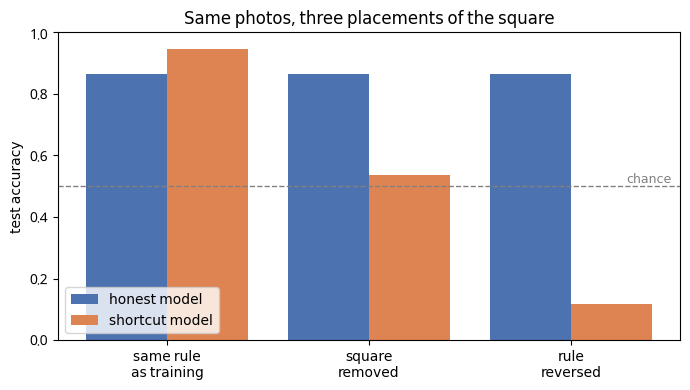
test set        honest    shortcut
matched          0.865       0.946
clean            0.866       0.537
flipped          0.866       0.116
When the square's rule is reversed, the shortcut model drops to 0.116. The honest model, given the same images, scores 0.866.
A score below one half matters. A model that simply ignored the photo would land near chance. Falling below chance means the model is still following a rule, and the rule is now wrong. Most of its decisions were coming from the square, so reversing the square reverses most of its decisions.
With the square removed altogether, the shortcut model scores 0.537. This is the realistic case: a model trained on watermarked photos, deployed on photos without one. It is a that no ordinary test split would have shown you.
Each column is one cat with the square stamped on. Compare the bottom row with the middle row: where does the shortcut model's map concentrate?
# Grad-CAM: weight each channel of the last 8x8 feature map by how much the
# predicted class's score depends on it, sum, and keep the positive part.
# The result is a coarse map of where the evidence for the decision came from.
#
# We probe BOTH models on the same images — every test photo with the square
# stamped on — and measure how much of each map lands on the square's cell.
CELL = 32 // 8  # one Grad-CAM cell covers 4x4 input pixels
# The square sits in the last cell, but an 8x8 map is coarse and its peak
# smears one cell inward, so we count the corner block that reaches one cell
# beyond the square. `uniform_share` below is that block's share of a flat map.
r0 = max(0, (32 - PATCH) // CELL - 1)
patch_cells = slice(r0, 8)


def gradcam(model, images_u8):
    """Return (cams[N, 8, 8], predicted labels) for a batch."""
    feats = model.features(to_input(images_u8))
    feats.retain_grad()
    logits = model.head(feats.mean(dim=(2, 3)))
    pred = logits.argmax(1)
    model.zero_grad(set_to_none=True)
    logits.gather(1, pred[:, None]).sum().backward()
    weights = feats.grad.mean(dim=(2, 3), keepdim=True)
    cams = F.relu((weights * feats).sum(1)).detach()
    return cams, pred.detach()


def patch_attention(model, images_u8):
    """Mean share of Grad-CAM mass that falls on the square's cell(s)."""
    shares = []
    for i in range(0, len(images_u8), 250):
        cams, _ = gradcam(model, images_u8[i : i + 250])
        mass = cams.sum(dim=(1, 2))
        on_patch = cams[:, patch_cells, patch_cells].sum(dim=(1, 2))
        valid = mass > 0
        shares.append((on_patch[valid] / mass[valid]).cpu())
    return float(torch.cat(shares).mean())


probe = paint(x_test, torch.ones(n_test, dtype=torch.bool, device=device))
patch_attention_honest = round(patch_attention(honest, probe), 4)
patch_attention_shortcut = round(patch_attention(shortcut, probe), 4)
attention_gap = round(patch_attention_shortcut - patch_attention_honest, 4)
uniform_share = round(((8 - r0) ** 2) / 64, 4)


# Pick demonstrative examples instead of indexing blindly: cats that the
# honest model calls cat, the shortcut model calls dog, once the square is on.
def gradcam_all(model, images_u8):
    parts = [gradcam(model, images_u8[i : i + 250]) for i in range(0, len(images_u8), 250)]
    return torch.cat([c for c, _ in parts]), torch.cat([p for _, p in parts])


cats = (y_test == 0).nonzero().squeeze(1)
cam_h, pred_h = gradcam_all(honest, probe[cats])
cam_s, pred_s = gradcam_all(shortcut, probe[cats])
fooled = ((pred_h == 0) & (pred_s == 1)).nonzero().squeeze(1)[:6]
if len(fooled) == 0:  # nothing qualified: show the first cats rather than nothing
    fooled = torch.arange(6, device=device)


def up(c):
    return F.interpolate(
        c[None, None],
        size=32,
        mode="bilinear",
        align_corners=False,
    )[0, 0].cpu()


fig, axes = plt.subplots(3, len(fooled), figsize=(1.9 * len(fooled), 6))
axes = np.array(axes).reshape(3, -1)
row_titles = [
    label("photo + square", "الصورة + المربّع"),
    label("honest model", "النموذج النزيه"),
    label("shortcut model", "نموذج الاختصار"),
]


def pred_name(p):
    return label("dog", "كلب") if p == 1 else label("cat", "قطة")


for j, k in enumerate(fooled.tolist()):
    img = probe[cats[k]].permute(1, 2, 0).cpu().numpy()
    axes[0, j].imshow(img, interpolation="nearest")
    for row, (cams, preds) in enumerate([(cam_h, pred_h), (cam_s, pred_s)], start=1):
        axes[row, j].imshow(img, interpolation="nearest")
        axes[row, j].imshow(up(cams[k]), cmap="jet", alpha=0.5)
        axes[row, j].set_xlabel(pred_name(preds[k].item()), fontsize=9)
for row in range(3):
    for ax in axes[row]:
        ax.set_xticks([])
        ax.set_yticks([])
    axes[row, 0].set_ylabel(row_titles[row], fontsize=9)
fig.suptitle(
    label("Cats with the square: where each model looked", "قطط تحمل المربّع: أين نظر كلّ نموذج")
)
plt.tight_layout()
plt.show()

if env.lang == "ar":
    print("حصّة خريطة Grad-CAM الواقعة على المربّع (على صور الاختبار كلّها):")
    print(f"  لو توزّعت الخريطة بالتساوي   {uniform_share:.3f}")
    print(f"  النموذج النزيه               {patch_attention_honest:.3f}")
    print(f"  نموذج الاختصار               {patch_attention_shortcut:.3f}")
else:
    print("share of the Grad-CAM map that lands on the square (whole test set):")
    print(f"  if spread evenly   {uniform_share:.3f}")
    print(f"  honest model       {patch_attention_honest:.3f}")
    print(f"  shortcut model     {patch_attention_shortcut:.3f}")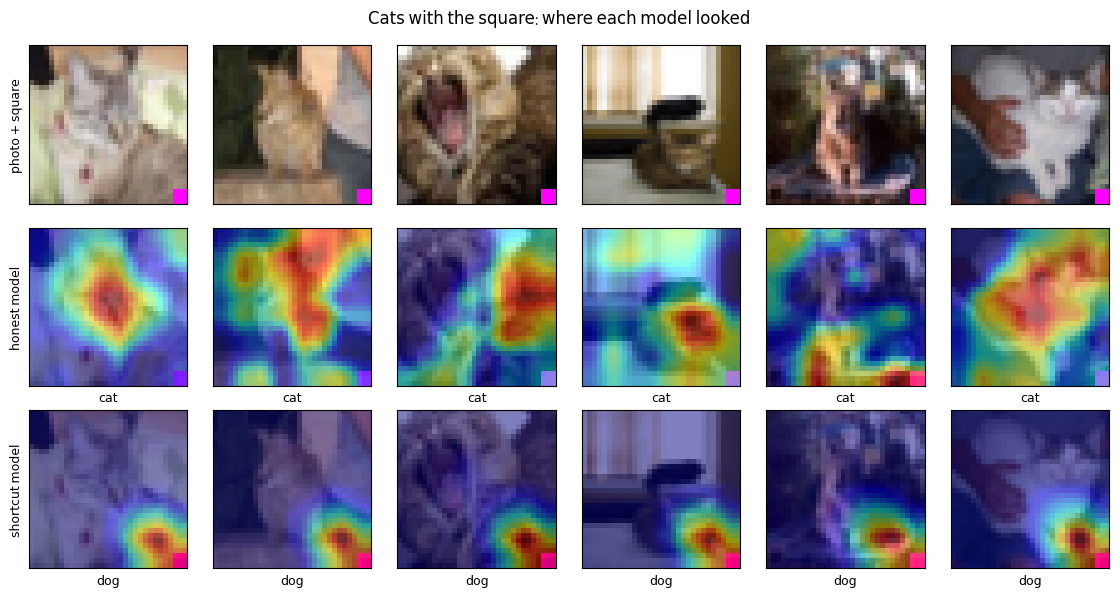
share of the Grad-CAM map that lands on the square (whole test set):
  if spread evenly   0.062
  honest model       0.038
  shortcut model     0.451
Across every test photo with the square stamped on, the corner block around the square holds 0.451 of the shortcut model's Grad-CAM map. For the honest model the figure is 0.038. A map spread evenly over the image would put 0.063 there.
The accuracy table told you that something was wrong. The maps tell you what it is, and they would have told you even without the stress test. That is the practical value of : you can inspect a model you have no flipped test for.
Keep one caution. Grad-CAM reads an 8 by 8 map, so it can locate the corner but not the exact square. A coarse map is evidence about where to look next, not proof of what the model computes.
Exercise
The square agreed with the label 0.95 of the time. Real spurious correlations are often far weaker. Set my_rate lower and re-run the cell. Before you do, write down a guess: at what rate does the gap between matched and flipped accuracy disappear? Does the attention on the square fall with it?
# YOUR TURN.
#
# The planted square agreed with the label most of the time. How weak can a
# spurious correlation be and still get taken? Set `my_rate` and re-run this
# cell. 0.5 means the square carries no information; 1.0 means it is perfect.
#
# Predict first: at what rate does the flipped-test accuracy stop falling
# below the matched-test accuracy?
my_rate = 0.75

ex_flags = draw_flags(y_train, my_rate, torch.Generator().manual_seed(env.cfg["seed"]))
ex_model = train(ex_flags, env.cfg["seed"], env.cfg["epochs"], f"rate={my_rate}")
ex_gen = torch.Generator().manual_seed(env.cfg["seed"] + 1)
ex_matched = accuracy(ex_model, paint(x_test, draw_flags(y_test, my_rate, ex_gen)))
ex_flipped = accuracy(ex_model, paint(x_test, draw_flags(y_test, 1.0 - my_rate, ex_gen)))
ex_attention = patch_attention(ex_model, probe)

if env.lang == "ar":
    print(
        f"\nنسبة الارتباط {my_rate}:  مطابق {ex_matched:.3f}   معكوس {ex_flipped:.3f}"
        f"   الانهيار {ex_matched - ex_flipped:+.3f}   انتباه المربّع {ex_attention:.3f}"
    )
else:
    print(
        f"\nrate {my_rate}:  matched {ex_matched:.3f}   flipped {ex_flipped:.3f}"
        f"   collapse {ex_matched - ex_flipped:+.3f}   attention on square {ex_attention:.3f}"
)A hint is available in the notebook — env.hint(2)
The square was easy to find because you planted it. Real shortcuts are not announced. What carries over is a set of questions to ask of any result that looks good:
Was the test set collected the same way as the training set? If so, it shares the training set's accidents.
What would the score be if one suspicious feature were removed, or reversed? Build that test even when it is awkward.
Where does the model look? An attribution map takes seconds to draw, and it is the only check here that does not require knowing the shortcut in advance.
The control is checked first. The peak GPU memory printed at the end is the number the profile should declare.
# The control comes first: a shortcut can only be "caught" relative to a model
# that actually learned cats and dogs. If this fails, train longer.
honest_ok = env.check("honest-model-learns", honest_clean_acc)
collapse_ok = env.check("shortcut-collapses", shortcut_collapse)
attention_ok = env.check("gradcam-finds-square", attention_gap)

if device == "cuda":  # the measured peak is what `requires.vramGb` should declare
    peak_vram_gb = round(torch.cuda.max_memory_allocated() / 1e9, 2)
    if env.lang == "ar":
        print(f"ذروة استهلاك ذاكرة GPU: {peak_vram_gb} GB")
    else:
print(f"peak VRAM: {peak_vram_gb} GB")✓ Honest model accuracy on clean test images: 0.866 (needs ≥ 0.75)
✓ Shortcut model accuracy lost when the square's rule is reversed: 0.83 (needs ≥ 0.3)
✓ Extra share of the shortcut model's Grad-CAM map on the square, over the honest model's: 0.4127 (needs ≥ 0.1)
peak VRAM: 0.95 GBreceipt = env.receipt()Workshop complete.
Completion code: AZ-██████████
Paste it on the workshop's page on Azimuth to record it.Terms in this workshop
- Generalizationالتعميم
- Overfittingفرط التخصيص
- Classificationالتصنيف
- Heatmapخريطة حرارية
- Out-of-Distributionخارج التوزيع
- Robustnessالمتانة